PowerShell scripts are stored in .ps1 files. You cannot run a script by simply double-clicking a file; this design helps avoid accidental harm to your systems.
Running Scripts
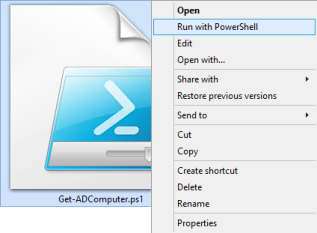
To execute a script, right-click it and choose Run with PowerShell:
Execution Policy
There is a policy that restricts script execution. You can check this policy by running the Get-ExecutionPolicy command in PowerShell:

Execution Policy Values
You will get one of the following values:
-
Restricted — No scripts are allowed. This is the default setting, so you will see it the first time you run the command.
-
AllSigned — You can run scripts signed by a trusted developer. Before executing, a script will ask you to confirm that you want to run it.
-
RemoteSigned — You can run your own scripts or scripts signed by a trusted developer.
-
Unrestricted — You can run any script you want.
Changing the Execution Policy
To start working with PowerShell, you’ll need to change the policy setting from Restricted to RemoteSigned using the Set-ExecutionPolicy RemoteSigned command: