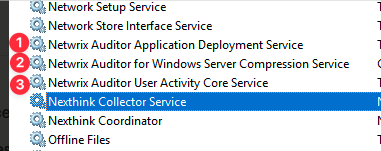
I am new to Netwrix Auditor Solution. Recently I created a Mon. Plan for monitoring Windows Server Auditing (WSA). After gathering activities for couple of days. today, I deleted the Mon. Plan. However, on the server side, I am seeing few services related to Netwrix Is still RUNNING as you can see in the screenshot below. So, Is It FINE to see these services still active & running? Is this expected behavior from the auditor? OR those services should have been stopped/deleted once we remove the associated Mon. Plan ? Kindly assist me in this. With Many Thanks!
Thanks for your questions about the Windows Server Monitoring Plan and the services. When you remove an item from a plan or remove a plan, it currently does not remove the installed services from the endpoints. It is something that you can uninstall manually.
If you have any issues removing the service, please let me know and I’ll be happy to help.
Michael Purdin
Manager, Technical Support Engineering
Thank you for the response. I could see there Is some program has been Installed as well. so, I think, we should remove that as well & then check the services , If those are still there we can still disable it.
Further, wanted to ask , Does server required reboot post this changes ?
Also worth noting: the service highlighted in your screenshot, the Nexthink Collector Service, is not a Netwrix service, so you can disregard that one.
Application Deployment Service — Installed for either a File Server plan or, if on a Domain Controller, a Logon Activity plan. This does not uninstall automatically and would need to be removed manually.
Windows Server Compression Service — Installed for a Windows Server plan. This also does not uninstall automatically and requires manual removal.
User Activity Core Service — Installed with a User Activity plan. Unlike the other two, this one will uninstall automatically when the item is removed from the Monitoring Plan. To do so, remove the item and monitor the uninstall progress under Edit Data Source → Monitored Computers. Once complete, you can remove the plan. If you have already removed the User Activity plan, you will need to manually uninstall the service. Also note that the User Activity Monitoring Plan installs the Infognition ScreenPressor codec, which must be uninstalled manually regardless of whether the Core Service was removed by the plan.
You would not need to reboot after removing any of these services.
Michael Purdin
Manager, Technical Support Engineering
I understood now. I created WSA Plan recently for Investigating something(for that case has been raised). Earlier, the same server was under “User Activity” Plan then the plan(Item) was disabled (Not Removed). so, to remove the User Activity Core Service. I will have to go to Programs & Features then Uninstall the codec Right OR any other script or something I have to do it to remove codec as well. your response will be really appreciated.
For the User Activity Core Service, even with the plan being Disabled, you can remove the Item from the plan and it should uninstall the service from the end points.