Is there a way to match the Build number to the release number? Or is the release number shown in Auditor somewhere?


Yes, but when click update, it states you are using the latest build(Clearly not the latest build). Is there any way to update without having to download and reinstall the client?
Curiosity. While looking on the Netwrix Auditor License page it says my product version is current and up to date. It’s also set to check updates automatically; however, it says my current version is 10.8 (Build 15036), and that I’m using the latest released product version. But when I look at My Products in the Netwrix Portal there is a newer version 10.8 (Build 15173).
Why doesn’t the local install reflect an update as soon as the patch is available for download? And I also noticed that we are not receiving any emails about the patch other than through this community board that I just happened to sign up for.
Since we are licensed users, how do we receive notifications of patch updates availability?
Thank you,
Robert

Hi Matt,
Unfortunately, yes, that is currently the only way to update. There is no automatic download and installation process available at the moment. I think this would make a great feature request if you’d like to suggest it.
Best regards, Evgenii
Good evening Robert,
That’s correct - not all updates are pushed through the product’s automatic update check.
@derek.putnam, could you please advise how to subscribe to release notifications? Thanks in advance!
Best regards, Evgenii
Hi Marc,
Yes, that’s correct - 10 is the major version, 8 is the minor version, then comes the build number 15173, and the last digit is always 0. I was just indicating where you can view the build number in the About page. Thank you for noting the FAQ.
Best regards, Evgenii
I was not noticing that the Build number in the UI was representative of the build section of the version number. The last “0” threw me off.
Hi @mrmac,
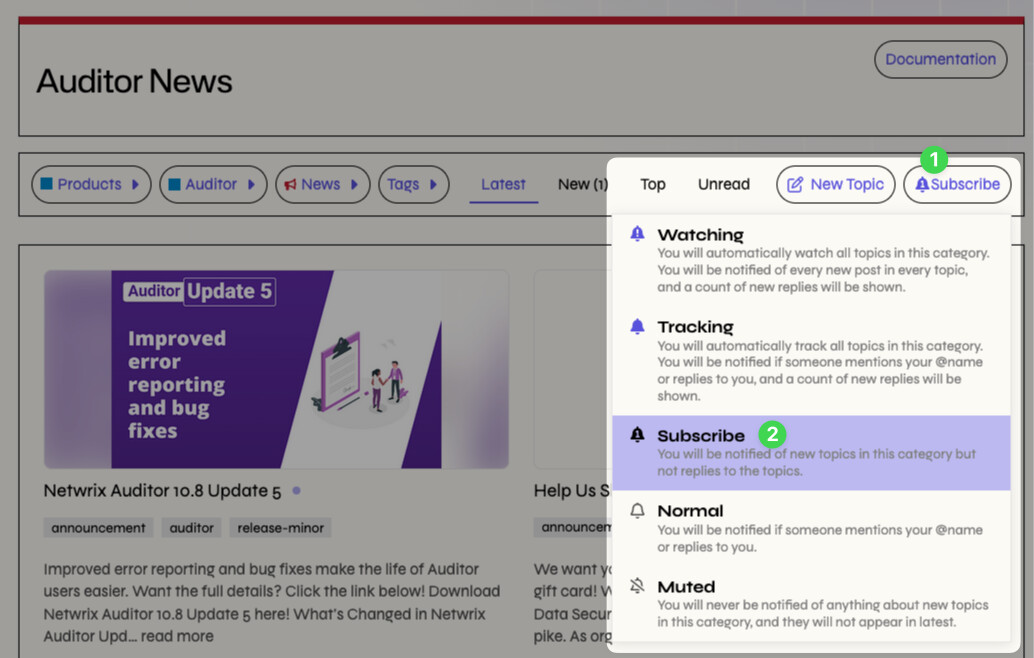
All release notes will be posted to Auditor > News! If you change your notification level to Subscribe, you’ll be alerted to any new topics!