Netwrix is pleased to announce the general availability of Netwrix Endpoint Policy Manager build number 25.10. This release includes a number of updates for for the CSE, MMC, EPM Cloud, and more!
Endpoint Policy Manager CSE
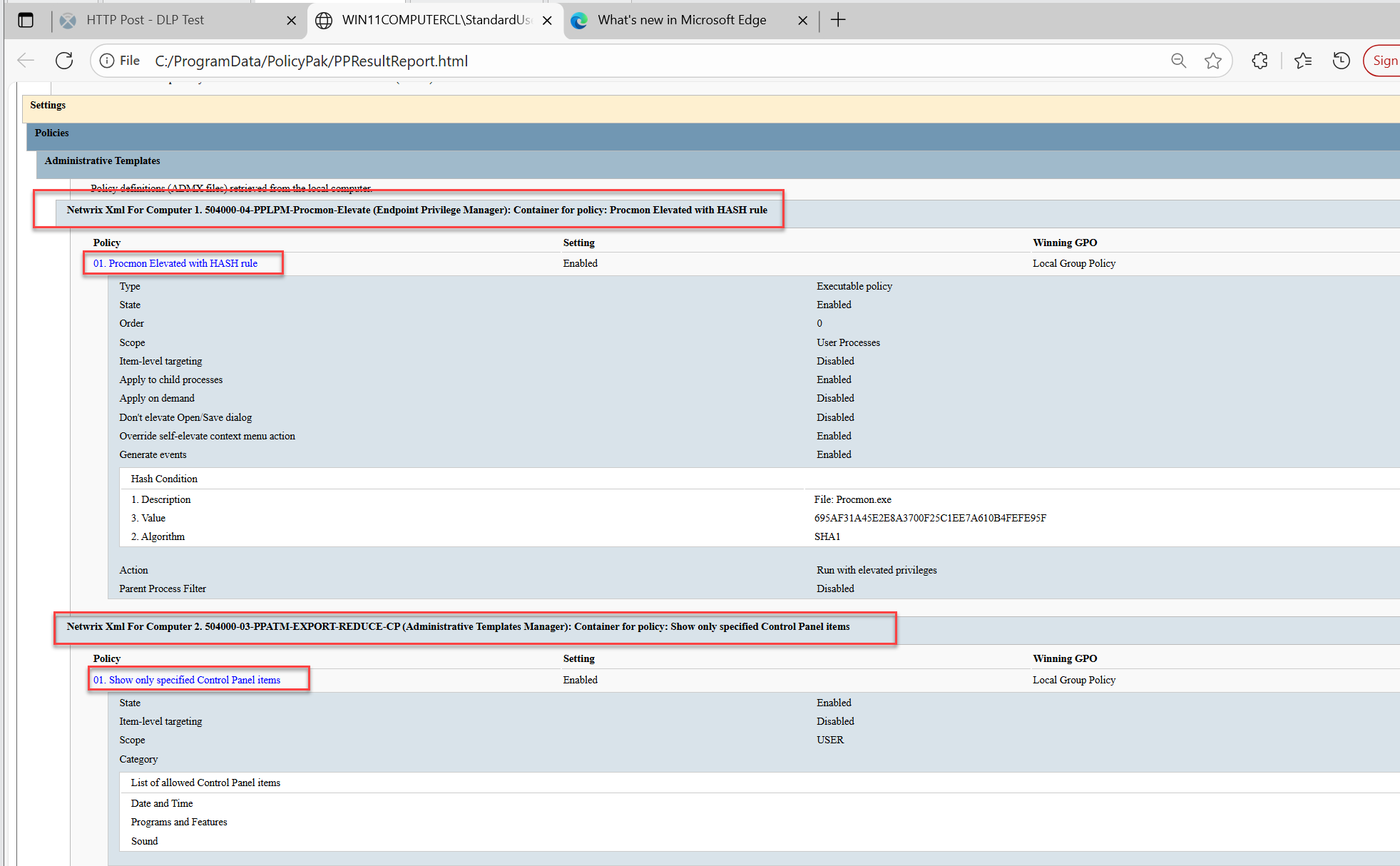
PPRESULTS Reports
Now you can get a GPRESULTS-style report by using the PPRESULTS command line. You can use the following command line switches:
- /PPCLOUD - Use PPCloud data for reports (based on gpresult report).
- /PPXML - Use PPXML user, group, and computer data for reports (based on gpresult report).
- /PPALL - Use all available data for reports (based on gpresult report).
Example output using /PPXML (which would usually be used in conjunction with the MDM deployment method):
Endpoint Privilege Manager for Windows Improvements & Fixes
Admin Approval Updates
Admin Approval is now updated to help you match a “Session code”. In this way if you’re attempting to field multiple requests, you can easily match the response to the request.


ADMX setting for Non-Secure Desktop with Netwrix Privilege Secure
If desired, you can have your EPM Client interactions with Netwrix Privilege Secure be on the non-secure desktop; this is not recommended, but was a customer request.

MMC Updates
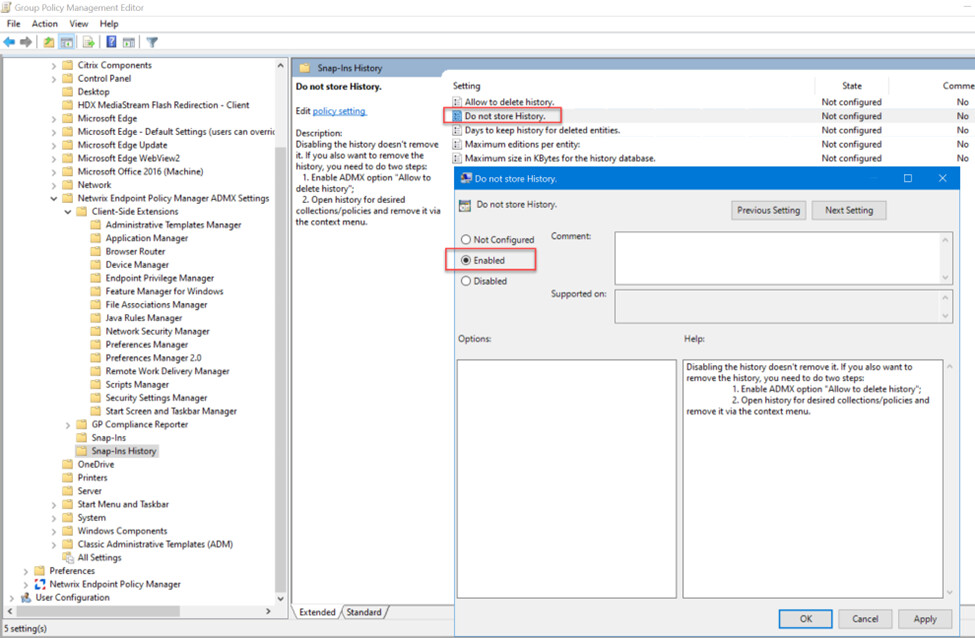
Many improvements on MMC history. First, if desired, you can bypass the saving of history when using the MMC using ADMX “Do not store History.”
Beyond that, you may also now “Delete all history for the whole snapin” and/or “Delete all history for the selected policy(-ies).”
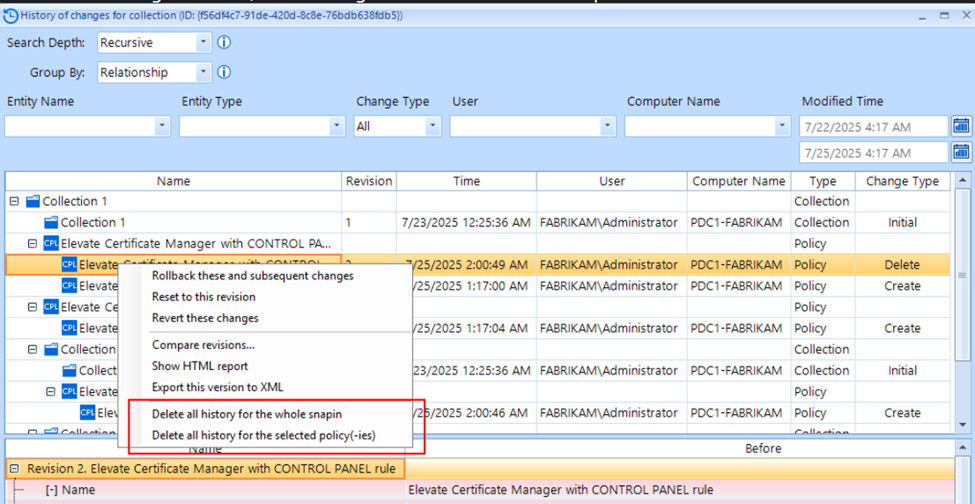
Additionally, you can now compare different versions and see the XML changes with “Compare revisions.”

As well as “Show HTML report” (shown here) and “Export this version to XML”.
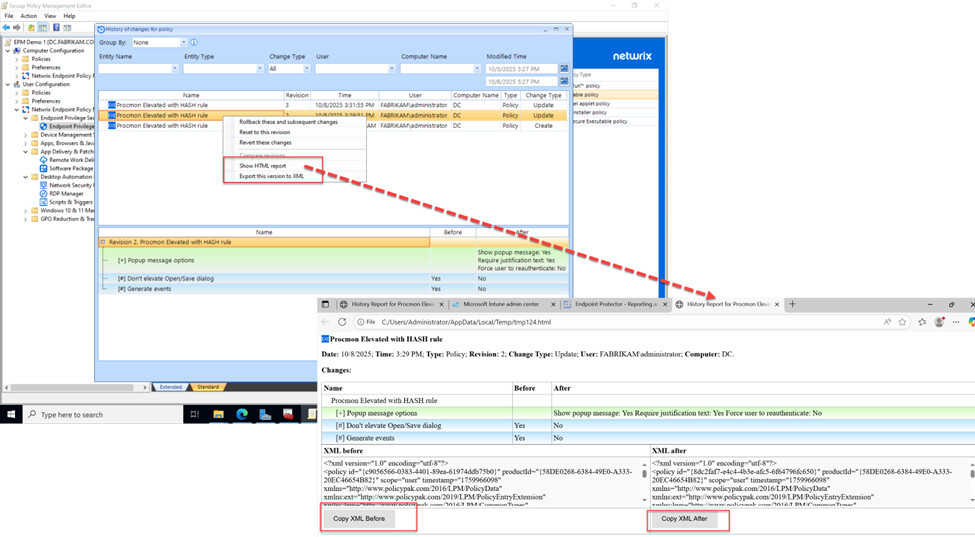
Lastly, you can “Reset to this revision” (Reverts all changes after selected version) or “Revert these changes” which will revert only one particular selected change.

Misc Endpoint Policy Manager for Windows Fixes & Updates:
Resolved Issues in This Release
We are pleased to announce the following fixes and improvements in this release of Netwrix Endpoint Privilege Manager:
- Improved CSE Resilience after attempted uninstall: The MSI is updated to be more resilient something intentionally or unintentionally wipes out the PolicyPak CSE. Occasionally the CSE MSI would be end up in a “zombie” state; and this fix attempts to ensure that at least MSI Repair succeeds when our binaries are missing. The MSI repair will now succeed when the files inside %ProgramFiles%\PolicyPak and/or the files %ProgramFiles(x86)%\PolicyPak are missing either partially or completely.
- Windows 11 Right-click improvements: We’ve had a few reports that the EPM right-click menu doesn’t always appear. There’s a bug in Windows Explorer we’re trying to work around and this should improve things.
Endpoint Policy Manager Cloud
Auto-Retirement of Computers
Update: 11/10/2025: Note this feature “kicks in” on Nov 15th. Meaning that on or around Nov 15th, when this checkbox is checked, that computers which are X days of inactivity will then automatically transition to DELETED state. You will not see movement from computers before this date. If you check this checkbox AFTER Nov 15th, 2025 and then apply, then computers which are X days of inactivity will immediately transition to DELETE state. (Typical motion is every 10 minutes, up to 500 computers per batch.)
A much requested feature (especially for larger customers, but great for everyone) is a way to “Auto Retire” computers which haven’t checked in based upon a time period.
To activate, go to “Company Details" tab. In the “Computer auto-retirement” section Turn ON checkbox “Auto-retirement of inactive computers” and click to “Save” button. Default is 90 days.
Computers will then transition to Deleted. If you also want them permanently expunged, also select the “Delete retired computers permanently” checkbox.

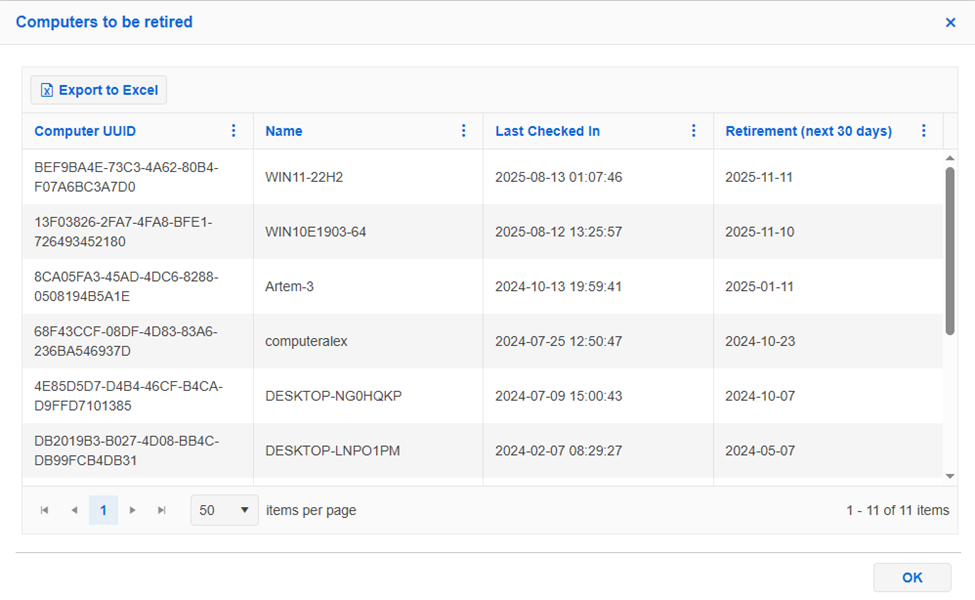
For more details, go to “Company Details” tab and in the “Action” panel you click to “Computers to be retired” link and “Customer Log.”

In the “Computer to retired” window you can see computers that will be retired:
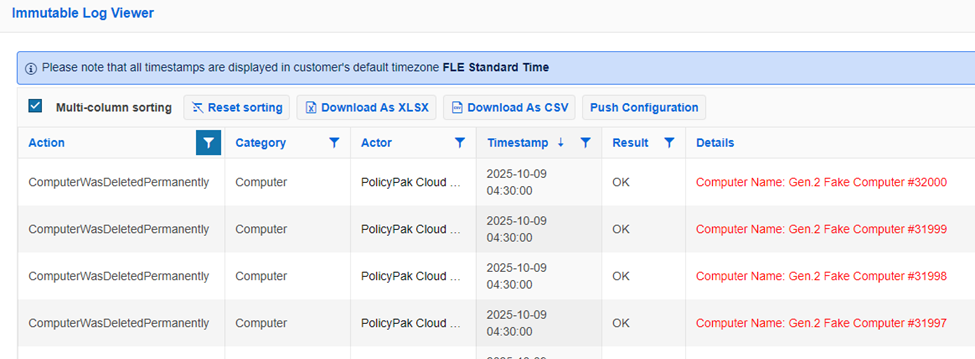
And in “Company Details | Customer log” link in the “Action” panel and view computers that was retired “ComputerWasDeletedPermanently” for logging of this transition.
Clone Group
Clone Group feature lets you take an existing group and all linked policies and…. Clone it !
Then you can tweak this cloned group (and policies) with updates to policies to do pre-flight testing before you move computers into your original group.
In this way, you can have copies of groups, with no computers for some testing and know your policies are going to work when you make your changes to your existing group(s).
To see this feature, go to “Computer groups” tab and select any Group with policies and click to “Clone group” link in the “Action panel”
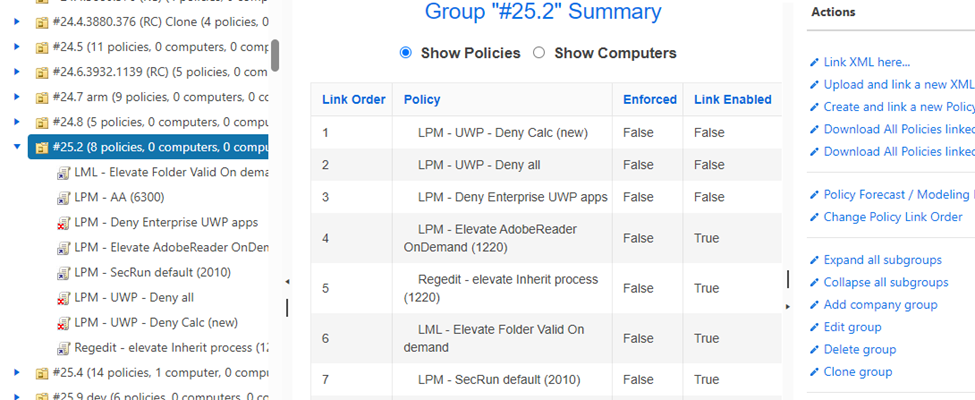
Enter Name and choose “Parent group” ->click to “Clone” button !

The new Group is created with all policies linked to source group with the same order.

New Bulk Add/Move option: “Also remove from existing source group(s)”
With this new option, you can also remove added or moved computers from the original source groups.
To see this function, go to “Computer Group” tab and select any Group in the list. Then click to “Bulk add/move computer(s) to Group” link in the “Action” menu.
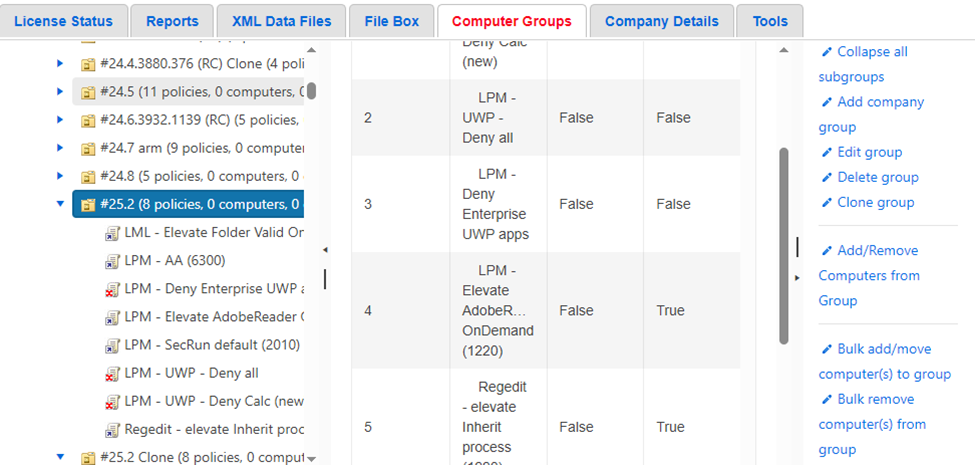
New option will appear as follows:

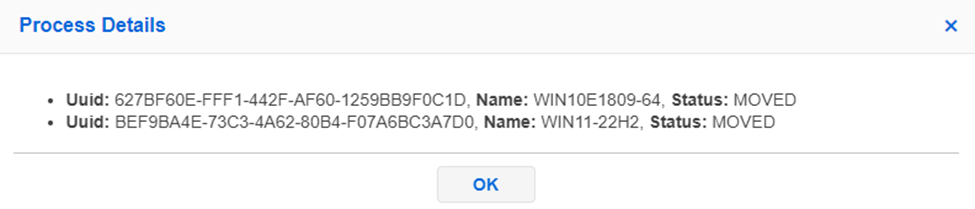
Computers moved to another group result show Status: MOVED like this
Event Viewing: Selecting Rows for Copy and Paste
You can now select a row and Copy to Clipboard…

Result pasting into Excel for example…

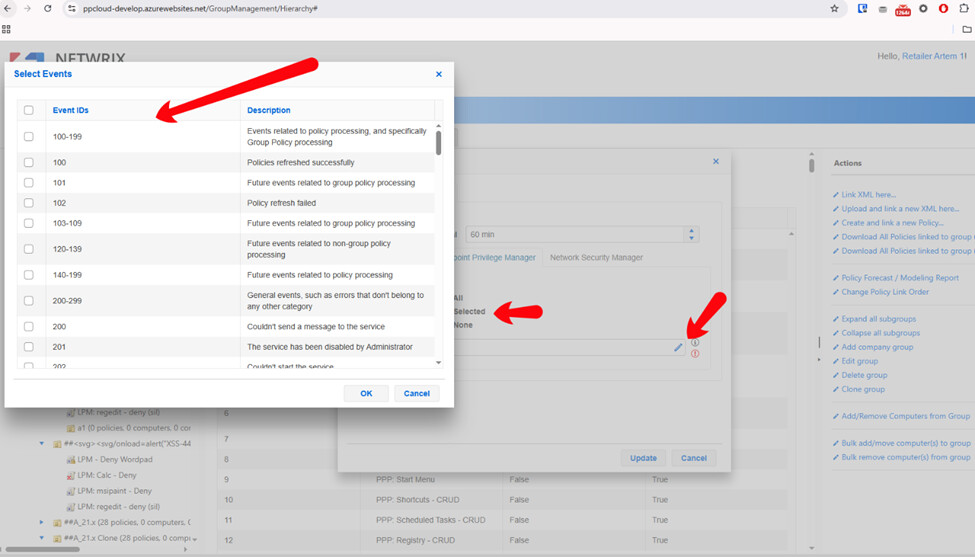
Event Selecting: Now easier to select events
You can now select specific event types, instead of having to look up the events and type them in manually.
Endpoint Policy Manager for Mac Fixes & Updates
Deprecated SUDO policy replaced with SUDOERS policy in EPM Cloud like what’s seen here.
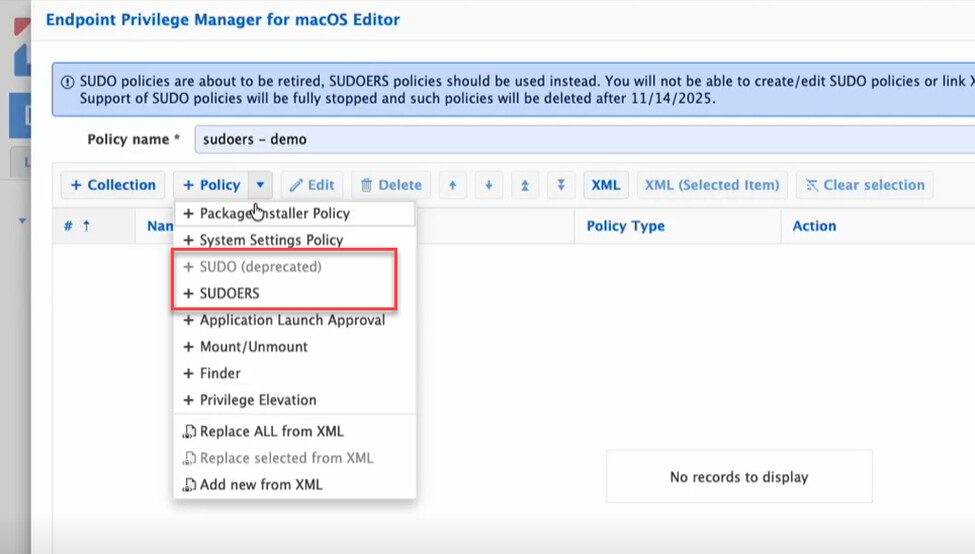
Customers must transition these SUDO (deprecated) policies in 30 days from SUDO (deprecated) to SUDOERS policy type. These policies will be automatically removed from your EPM Cloud instance at the 30 day period WITHOUT additional notice.
Note: Existing SUDO (deprecated) policies may be ENABLED or DISABLED but not CREATED or MODIFIED due to this change. The idea is that you can:
- Enable the SUDO (deprecated) policies and apply to a machine or two to see CURRENT behavior
- Craft your new SUDOERS policy type and apply to DIFFERENT machines to reproduce the same effect with the new policy type
- Delete the SUDO (deprecated) policies after your SUDOERS policy is sufficiently tested.
Again: SUDO (deprecated) policies will be automatically removed from your EPM Cloud instance at the 30 day period WITHOUT additional notice.
Learn to use the new SUDOERs policy type with the following four videos:
Video 1: Understanding SUDOERS and Configuration file Locally (without EPM involvement) for BASIC rules. Link.
Video 2: Using EPM Cloud for BASIC SUDOERS rules. Link.
Video 3: Understanding SUDOERS and Configuration file locally (without EPM involvement) for FULL rules. Link.
Video 4: Using EPM Cloud for FULL SUDOERS rules. Link.
Things we say with every major announcement…
Always back up your GPOs and or Cloud XMLs:
- Restoration is VERY EASY. Re-creation of policies is NOT EASY.
- Backup your GPOs today (video).
- Backup your XML Data Files today from Endpoint Policy Manager Cloud (screenshot)
Remember that Endpoint Policy Manager acts as part of the operating system and you should do SMALL SCALE to LARGE SCALE testing with RINGS before rolling it out broadly.
Updating both the CSE and MMC snap-in up to date is recommended for all customers.
Specific upgrade guidance based upon your circumstances:
How to use the Community for Netwrix Endpoint Policy Manager…
Please use the Netwrix Community for the following items:
- Ideas to improve Endpoint Policy Manager
- General non-support / How-do-I questions
The URL for Endpoint Policy Manager Community is here: https://community.netwrix.com/c/products/endpoint-policy-manager/discussions-questions/131
How to get support for Netwrix Endpoint Policy Manager…
For help on specific support issues you are welcome to open support cases. Use our Support Portal (www.netwrix.com/support.html) to submit a case. Please refer to our Support Reference Guide (www.netwrix.com/download/documents/customer_support_program_guide.pdf) for details on the support process, including available contact methods, SLAs, and case severity guidelines.
Thank you for being a Netwrix Endpoint Policy Manager customer!
Need help with this update?
There are many different ways to get help with our products!
| Situation | Action |
|---|---|
| If you feel the product is broken and not working as intended… | Contact Support |
| If you have a question you’d like to ask other experts… | Create a discussion in the community: Auditor > Discussions & Questions |
| If you have a feature request… | Let our product team know directly: Endpoint Policy Manager > Ideas |
| If you have something cool to show… | Show everyone what you built: Endpoint Policy Manager > Show & Tell |
What are your thoughts?
We are always happy to hear from our users on what you like, and what you hope to see in the future. Please, share your thoughts below!