Netwrix is pleased to announce the general availability of Netwrix Endpoint Protector 2511 EPP Client & Enforced Encryption release. With this release, you’ll notice significant compliance and functional enhancements to Netwrix Endpoint Protection Clients, including the following:
Want the full details? Click the link below!
What’s New in Netwrix Endpoint Protector 2511 EPP Client & Enforced Encryption
The following components have been updated with this release:
- Windows Client: 2511.1.1.3
- Mac Client: 2511.2.1.3
- Linux Client: 2511.3.1.0
- EE Client’s: 2511.4.1.1
- Browser print plugin: 1.10 (not changed)
- Outlook add-in: 1.0 (not changed)
IMPORTANT: This release does not alter EPP Server versions and focuses solely on changes to the EPP & EE Client.
Note: The 2511 Clients have been tested in conjunction with the 2509 and 2510 EPP Servers, as well as EPP Unify 7.4. For optimal performance, we recommend using these clients paired with the corresponding server versions. Please note that these clients are incompatible with older EPP Server versions due to the implementation of a new versioning schema. Please refer to the announcement article.
IMPORTANT NOTE: Customers who utilize the embedded EPP Server Client upgrade feature must first upgrade their EPP Client to the 5.9.4.3 release as a mandatory prerequisite before proceeding to the 2511 upgrade. This requirement is due to essential Netwrix certificate changes, and failing to do so will result in unsuccessful EPP Client upgrades. Please refer to article in migration procedure.
AI Interaction Visibility and Control in Endpoint Protector: Data Loss Prevention for LLMs
In response to the increasing integration of artificial intelligence tools into everyday business processes, Endpoint Protector (EPP), a leader in Data Loss Prevention (DLP) technology, is excited to introduce a feature that elevates visibility and control over information exchanges with popular AI chat applications by Introducing Data Loss Prevention for LLMs. This functionality empowers businesses with precise control over who can engage with AI prompts through web applications, enabling the management of sensitive content whether typed or attached.
By incorporating this capability into our DLP solutions, we ensure secure and compliant use of cutting-edge AI technologies, including ChatGPT, Microsoft Copilot, Google Gemini, DeepSeek, X Grok, and Claude, reinforcing our commitment to delivering superior data protection. Moreover, we extend coverage for Microsoft Copilot in Windows ecosystem, supporting the embedded Copilot add-in within Windows 11, the New Outlook, and the New Teams.
As artificial intelligence continues to transform communication and collaboration processes, Endpoint Protector is committed to developing innovative solutions that address the complex challenges of safeguarding data in modern enterprises. This release marks a significant advancement in our mission to provide superior data security in an increasingly AI-driven world.
AI demo video:
Copilot demo video:
For more information, please refer to the dedicated User Manual chapter about Netwrix DLP for AI.
Virtual Machine Data Exchange
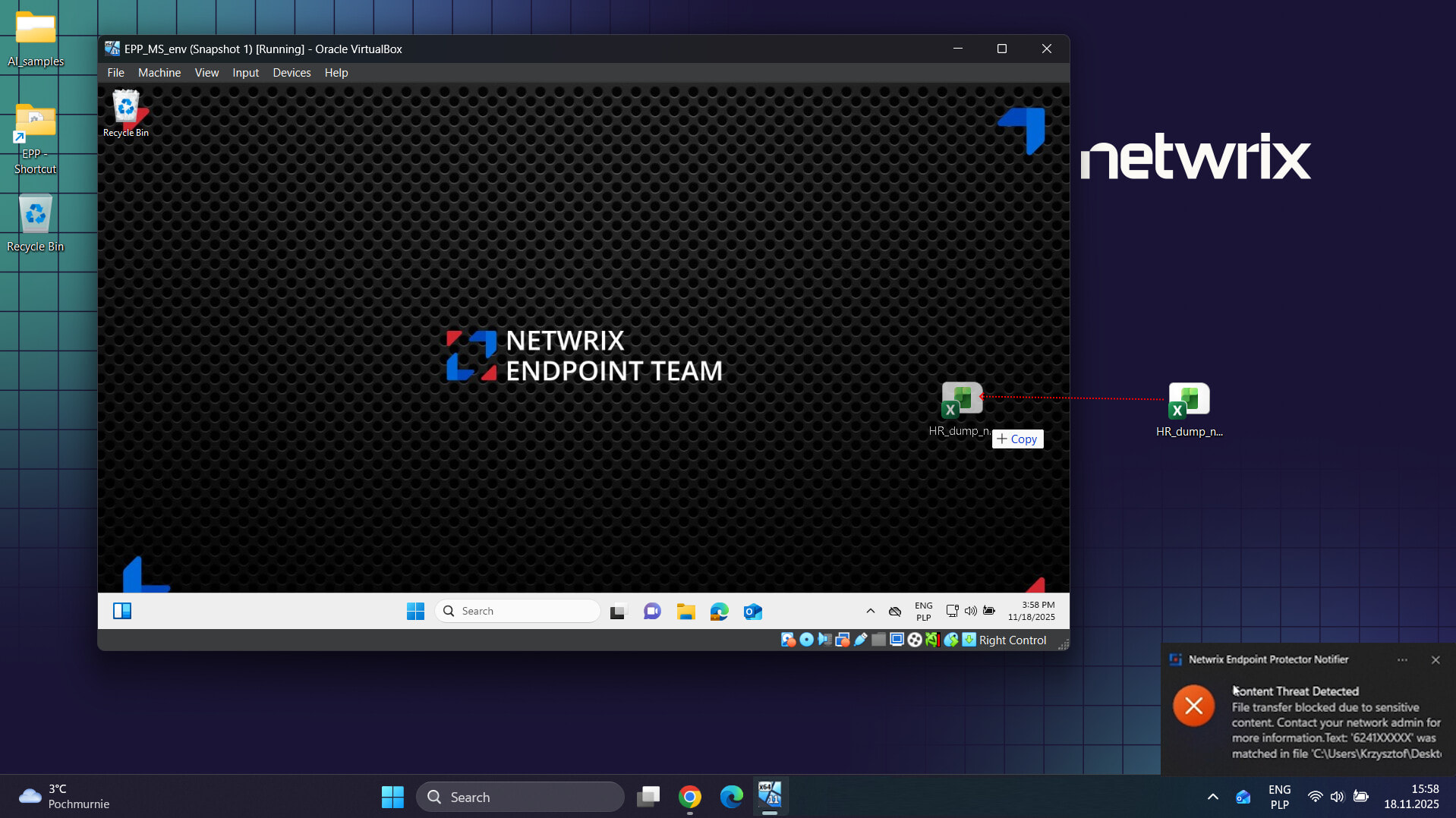
We have enhanced the EPP Client’s visibility regarding clipboard and file exchanges with virtual machines provisioned locally on PCs via VMware Workstation for Windows and VMware Fusion for macOS.
Note: For full functional coverage, an upcoming EPP Server 2512 or higher version will be required.
HTTP/2 Support for DPI Module
We have enhanced our current DPI (Deep Packet Inspection) module to support the HTTP/2 protocol. When this feature is configured, the protocol no longer needs to be downgraded to its first version during protocol negotiation, resulting in improved performance and more efficient web traffic analysis. This advancement enables faster data processing and provides a more comprehensive understanding of network activities, thereby enhancing both security and user experience.

Enhanced Security with Improved EPP Client Tamper Mode
We have enhanced the EPP Client Tamper mode to improve security for driver operations and service management. With tamper mode active, the unloading or loading of drivers is now prevented, and service restarts by non-System users are disallowed; however, self-initiated client upgrades are authorized. These enhancements aim to provide robust protection against unauthorized modifications while ensuring seamless upgrade processes.

New Applications Monitored
- WeCom: Ensure compliance and security for communications within WeCom, supported on Windows and macOS.
- BOX: Enhanced visibility for the new native BOX sync app for Windows and macOS.
- Slab: Enhancing visibility over file exchanges within this application.
- Asana: Enhancing visibility over file exchanges with the Asana application.
This expansion of monitored applications reflects our ongoing commitment to addressing complex data security needs and providing detailed oversight of digital communications. By integrating these applications into Content Aware Protection, Endpoint Protector ensures that your organization’s sensitive data remains protected, regardless of the platform used.
Distinguish Between Encrypted and Non-Encrypted PDF Files
Successfully implemented the ability to differentiate between encrypted and non-encrypted PDF files, ensuring accurate identification and readability checks.

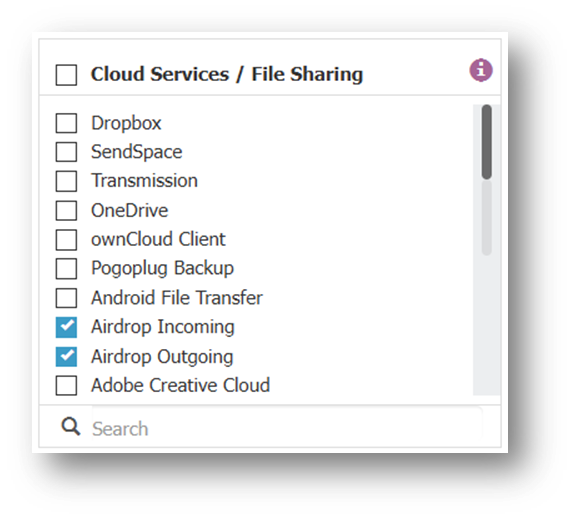
Differentiated Incoming and Outgoing Traffic for AirDrop
Successfully implemented differentiation for AirDrop traffic on exit points, allowing incoming files while blocking outgoing transfers. This adjustment preserves AirDrop functionality by ensuring only outbound transfers are restricted, addressing the original issue without entirely disabling the feature.
DPI Loopback Proxy Address Configuration
Introduced an option for configuring DPI loopback proxy addresses in the EPP Client for Linux to support VPN proxies like Cisco AnyConnect.
Note: For full compatibility, an upcoming EPP Server 2512 server will be required.

FIPS 140-3 Validation Information in “About” Section for EE
Updated the “About” section in EE to include FIPS 140-3 Validated Mode status and details of the FIPS module for both Windows and macOS clients, providing links and version information for improved transparency and compliance.

Bug Fixes and Miscellaneous Updates
| Component | Description | Case # | Escalation # |
|---|---|---|---|
| General | EPP Client to Server Communication Compression In this release, we’ve introduced a Client to Server compression feature, which will be utilized in upcoming versions of EPP Servers (5.9.5.0 and higher) and Unify releases (7.4 and higher). This enhancement is designed to conserve bandwidth and reduce transfer limits on metered connections, as well as to lower costs associated with cloud providers. |
382009, 382939, 383176 | 00437920 |
| General | Implemented Rate Limiting for OTP Verification To enhance security, rate limiting has been added to the OTP verification process. Users entering 3 incorrect OTPs within a minute will have their attempts blocked for the following 5 minutes. |
346608 | |
| General | EPP Agent Updated with Netwrix Certificates EPP Agent for Windows now supports new Netwrix signing certificates for integrity checks and validations. |
362126 | |
| General | Update Notifier Application Name Replaced “Notifier Application” with “Netwrix Endpoint Protector Desktop Notifier” in all system tray and EPP Client notifications for a clearer and more complete identification. |
385910 | |
| General | Implementation of SID Field in Registration String Added a new SID field to clearly separate it from the hostname, while retaining support for the existing hostname\sid format to ensure backward compatibility. Updates were made on both the client and server sides for consistent parsing and sanitization. |
393887 | 00448448 |
| General | Enhanced OS Reporting with Compile Details Updated EPP Client to provide comprehensive OS reporting details, including custom builds like “Oracle Linux” or “Mint Linux,” alongside the main distribution. Reports now show: main distro (self-report) → RHEL X.abc (Oracle abc). Standard reporting for plain RHEL/Ubuntu/Debian remains unchanged, ensuring detailed and accurate OS identification and reporting. |
397551 | |
| General | Entra ID Authentication Enhancement for Self-Remediation Addressed authentication issues for customers using Entra ID with Self-Remediation and “Require Credentials” enabled. Enhanced functionality to fall back to interactive or network login when users lack the “Log on as a batch job” permission, resolving “Invalid credentials. (1385)” errors. This ensures seamless authentication flow even in cases where specific permissions are not granted, improving reliability and user experience. |
400360 | |
| General | Persistent Install Parameters During EPP Client/Server Upgrade Improved upgrade process to ensure “IPV6MAPPING,” “SUPPRESSRD,” and “DISABLECAP” parameters persist seamlessly during EPP Client and Server Client upgrades. |
402061 | 00448426 |
| General | Updated backend components to latest version OpenSSL, PCRE, |
402790, 387168 | |
| General | Fix for High CPU Usage Due to CssGuard Service Issues Addressed high CPU usage caused by cssguard service failures after EPP client upgrade, preventing the client from being uninstalled due to missing DLLs. Implemented a delay in service start attempts to resolve CPU core max-out situations. |
389637 | |
| General | Fixed Certificate Integrity Log Issue After Computer Name Change Resolved problem where DPI certificate integrity failure logs were mistakenly generated due to a computer name change, not reflecting updated certificates in the certificate manager. Ensures no erroneous logs are produced when computer names are changed and services are restarted. |
394605 | 00413365 |
| General | Improved Tamper Protection for EPP Client Enhanced tamper protection for EPP Client to address vulnerabilities where it can be removed using Windows API calls, like “MoveFileEx,” with admin privileges. Additionally, ensured removal of related registry entries to prevent unauthorized uninstallation via “msiexec” or external software like Revo Uninstaller. |
402710, 406056, 402231, 320104 | 00450947 |
| General | Fixed Blocking Issue for Apple Updates on EPP Mac Client Resolved an issue where EPP Mac Client version 3.0.4.0 blocked Apple updates by interfering with device rights. Ensures updates proceed without disruptions after upgrading to the latest client version. |
402197 | 00454951 |
| General | Fixed Issue with Notifier Start on Windows After Third-Party Tool Update Resolved a problem where the EPP client Notifier failed to start for a standard user if installation was performed by an Administrator during a third-party tool update process while both were logged in. Ensures Notifier runs correctly for all users post-installation. |
407830 | 00458093 |
| DC | Bluetooth Module Added to EPP Notifier on macOS A Bluetooth module has been introduced to EPP Notifier for macOS to handle radio state change notifications. |
358525 | |
| DC | Monitor Mount Points Under /mnt on Linux Added monitoring for file access on partitions mounted under /mnt, addressing customer needs for enhanced oversight |
366972 | 00427257 |
| DC | Improved SD Card Reader Remediation Enhanced handling of SD card reader connections: • No pop-up or “connected” log for empty readers. • Pop-up and logs (“Connected” and “Blocked”) appear when a card is inserted. • No “disconnected” log if only the card is removed; a log appears if the reader is disconnected. |
400618 | 00441007, 00441004 |
| DC | Fix for Missing File Shadowing on Copy Events on macOS Resolved an issue on macOS where file shadowing was missing for File Copy events to removable devices or network shares, ensuring shadows are now generated when file tracing and shadowing are enabled. |
319851 | |
| DC | Improved Remediation for Apple Magic Keyboard Resolved issue where the Apple Magic Keyboard could not be properly remediated with User Remediation Pop-Up enabled. The keyboard now correctly registers remediation attempts when powered off and on, without persistent notification errors. |
342260 | |
| DC | Fix for OTP Validation Across Incorrect CAP and DC Tabs Resolved an issue where an OTP used incorrectly in the DC tab invalidated it for the CAP tab, resulting in an “already used” message. The fix ensures OTPs retain validity for their intended use, allowing proper access granting in CAP after initial erroneous use. |
359575 | |
| DC | Detection Issue with Xerox Network Printers EPP fails to detect Xerox network printers installed via Xerox software, displaying for Network device Property. Updates are needed to ensure accurate detection and integration of these printers in the EPP client. |
385897 | |
| DC | Fixed Inactive Self Remediate Button for MTP Devices Addressed an issue where the Self Remediate button was inactive for MTP devices when connected with USB debugging enabled, even though remediation rights were set. This update ensures that the button is active and functional under the correct security settings. |
388245 | |
| DC | Adjustments for Transparent Mode Blocking Resolved issues where switching to Transparent mode incorrectly blocked Bluetooth devices, audio drivers, and webcams. Ensures Bluetooth remains active for essential peripherals like mice and keyboards, while webcams and card readers are properly blocked. |
389572 | 00445052 |
| DC | Fixed USB Detection Issue for BitLocker Encrypted Devices Corrected improper usage of CoInitializeSecurity() affecting USB device detection for BitLocker encryption. Ensures the function is called correctly once per process, allowing proper USB access under TD Level 3 rights. |
405562 | 00458188 |
| DC | Fixed Detection Issue for Wireless Voting Box USB Device Resolved an issue where the EPP client failed to detect and manage access to a wireless voting box connected via USB. Ensures accurate detection and management under the Device Control system for affected endpoints. |
405592 | 00430074 |
| DC | ** Fixed Issue with External DVD/CD-ROM Functionality** Resolved an issue on Windows 11 where external DVD/CD-ROM devices failed to read newly inserted CDs after ejecting the previous disc. Ensures continuous functionality and proper access for the External DVD-ROM under specified EPP Client and Server versions. |
408656 | 00460535 |
| CAP | Enhanced Detection of .CSV File Format Improved the detection process for .CSV files to ensure they are accurately identified as CSV files, rather than being misinterpreted as plain text files. This enhancement addresses issues with the Restrict Content Detection setting, providing consistent recognition and reporting on the EPP server. |
379179 | 00408710, 00453220 |
| CAP | Support for New File Formats in CAP and eD Policies Added detection capabilities for .sbf, .pk, and .ddd file formats within CAP and eD policies to enhance file management and security protocols. Note: For full compatibility, an upcoming EPP Server 2512 or higher version will be required. |
378583 | 327717 |
| CAP | Improved Brazil Phone Number Detection Enhanced detection to accurately identify Brazilian phone numbers, including mobile and landline formats. |
384232 | |
| CAP | Improved Brazil address Detection EPP now accurately detects and blocks partial Brazilian address formats making detection more useful for local standards and enhancing data leak prevention. |
384313 | |
| CAP | Updated US Passport PII Pattern Enhanced recognition of US passport numbers to include a new biometric format introduced in 2021, consisting of a letter followed by eight digits, ensuring comprehensive detection alongside the older nine-digit format. |
384243 | |
| CAP | Native Box Drive Application Support Implemented full CAP monitoring support for the native Box Drive application on Windows and macOS, replacing the retiring Box Sync to ensure seamless functionality. |
388021 | |
| CAP | Fix for Erroneous Folder Scans in EPP Client Resolved issue where copying folders triggered errors due to the EPP client mistakenly scanning folder paths as file paths, resulting in blocked clipboard event handling. The fix ensures smooth folder copy operations without erroneous retries or thread blocking, applicable to all scenarios, including image monitoring settings. |
388397 | |
| CAP | Allowlist IPs Directly in Network Extension Implemented configuration to ensure IPs that are allowlisted on the EPP server are also recognized by the Network Extension, preventing unnecessary interception and redirection. This update optimizes traffic handling by directly ignoring allowlisted IPs, improving efficiency while maintaining robust network security. Note: This applies only to IPs, not domains. |
367786 | |
| CAP | Fix for URL Blocking Issue with Facebook Resolved URL blocking issue on Linux EPP client affecting Facebook. The solution involves adding Facebook IPs to the QUIC/UDP block list, forcing browsers to use TCP for successful interception and blockage. This ensures effective enforcement of denylist policies and reliable URL blocking. |
392522 | 00448041 |
| CAP | Removed Unused “Send to EasyLock” Functionality Eliminated the outdated “Send to EasyLock” option from the right-click context menu, addressing customer concerns by ensuring it no longer appears for users, streamlining interface experience for those not utilizing Enforced Encryption. |
388648 | |
| CAP | Fix for Google Cloud Platform Access Issue Resolved issues where users experienced slow or failed access to Google Cloud Platform due to CAP events erroneously triggered by the Passports/US dataset. This fix ensures smooth login to GCP without unintended block policies, as confirmed by customer validation last week. |
392646 | 00412160 |
| CAP | Fix for URL Blocking Issue with Facebook Resolved Facebook URL blocking issue on EPP client for Linux by updating policies to ensure successful interception and enforcement of denylist rules. |
392522 | 00448041 |
| CAP | OCR Support Enhancement for Ukrainian Language Due to Microsoft’s OCR language limitations, EPP uses a workaround for Ukrainian OCR detection by leveraging the Russian language pack. When the system language is set to Ukrainian, the detection engine automatically utilizes Russian, provided the Russian language pack is installed, until native support becomes available. |
394401 | 00448010 |
| CAP | Improved Visibility Over Opera Used Protocols Enhanced control and monitoring by adjusting settings to improve visibility of protocols used by Opera, without compromising content inspection effectiveness. |
406335 | |
| CAP | Enhanced Blocking for Restricted Files in Google Drive Fixed issues where restricted files were not consistently blocked in Google Drive. Ensured proper enforcement of CAP policies across Windows and macOS, improving reliability in blocking PII content. |
319935 | |
| CAP | Fix for Missing Logs and Shadows on Printed Files Resolved an issue where File Transfer logs and shadows were not generated when printing embedded files from an Excel file under block and remediate policies. Ensured that both print attempts properly trigger FT logs and shadow creation, improving accurate reporting and remediation functionality. Further validation is recommended, especially when CAP policy is disabled, to ensure comprehensive fixes across scenarios. |
320092 | |
| CAP | Adjusted Printer Name Reporting in Remediation Events Updated the Destination column in CAP Reports to display the correct printer name for Content Remediation Events, aligning it with the naming used in Content Threat Blocked events. This ensures consistent and accurate device identification across all event types in the reports. |
320194 | |
| CAP | Improved PII Blocking in Slack Enhanced CAP policy enforcement to ensure files containing PII are effectively blocked in Slack, aligning with expected security protocols. |
320197 | |
| CAP | Improved File Blocking for GitHub Uploads Resolved issue where files were not blocked when uploaded to GitHub, despite an active CAP policy. The solution ensures correct enforcement of file type and content restrictions set in the policy. |
325564 | 00430839 |
| CAP | Improved Detection of .dxf AutoCAD Files Enhanced Endpoint Protector to ensure both .dwf and .dxf AutoCAD files are detected and intercepted as per the Content Aware Policy, |
327627 | 00409942, 00423115, 00410154 |
| CAP | Improved PII Detection and Blocking for Print Jobs Resolved issues in which CAP policies failed to block print jobs containing PII in Excel files. The updated enforcement ensures threats are detected, reported, and appropriately blocked as expected. |
341596 | |
| CAP | Enhanced Threat Detection for Printing on Redirected Printers Fixed the issue where CAP policies failed to detect threats when printing PDFs from Adobe Reader to redirected printers, particularly when scanning is set to ‘Per printed pages.’ Now, threats are correctly detected and print jobs are blocked as expected. |
342381 | |
| CAP | Resolved Sleep-Wake Issue Affecting PDF Printing Restrictions Fixed an issue where a PDF that was previously blocked from printing would be allowed after waking the computer from sleep. The fix ensures that CAP policies consistently block such documents from printing without needing to refresh the tab or restart the browser. |
346166 | |
| CAP | Reduced Log Redundancy for Small File Uploads to Google Drive Improved logging for files under 1MB uploaded to Google Drive, ensuring only one entry per threat is recorded in reports, rather than multiple (3-5) entries. This streamlines report accuracy and efficiency in threat monitoring. |
346796 | |
| CAP | Corrected Detection of New Outlook as Microsoft Teams Fixed an issue where New Outlook was mistakenly identified as Microsoft Teams on Windows. The update ensures correct detection of Outlook, specifically for “outlook.office.com,” addressing misidentification reported in support cases. |
364816, 364615, 361859, 364879 | 00424321, 00410015 |
| CAP | Fixed CAP Policy Application for Terminal Server Users Corrected an issue where CAP policies were incorrectly applied to all users instead of the intended user when a machine was marked as a terminal server. The update ensures that CAP scenarios consider the actual user, providing accurately targeted policy enforcement. |
365646 | 00412266 |
| CAP | Improved Website Reporting Accuracy for File Uploads Fixed an issue where file uploads to certain websites, like Smartsheets and WeTransfer, incorrectly recorded as generic Amazon S3 sites in logs. The update ensures CAP reports accurately reflect the actual destination website details, providing clearer insights into file upload activities. |
378240 | 00432792 |
| CAP | Fixed Blocking for Keynote (iWork) Files Resolved an issue where Keynote (iWork) files were not blocked due to being detected as ZIP archives. The update ensures these files are correctly identified and blocked as per the CAP policy. |
379815 | |
| CAP | False Positives in Custom Content Dictionary EPP incorrectly triggers false positives for longer words containing custom dictionary words during contextual detection, blocking content unnecessarily. Adjustments are needed to refine detection rules and eliminate these inaccuracies. |
385848 | 00433082 |
| CAP | Transfer Limit Issue for CAP on Specific Sites After reaching the CAP transfer limit, file uploads via sendspace.com or dlptest.com are still permitted, despite restriction settings. An update is required to enforce transfer limits correctly once reached. |
386639 | |
| CAP | Intermittent File Upload Allowance on Google Despite CAP Policy Fixed a rare issue where file uploads on Google Mail and Drive were allowed despite CAP Policy, ensuring each request now has a unique key for consistent policy enforcement. |
386804 | 00433965, 00456661, 00456592 |
| CAP | Inconsistent File Shadow Creation Despite Hash Generation Addressed an issue where file shadows are not consistently created for files with generated hashes when copied from a shared network location to a local hard drive. This fix ensures Endpoint Protector reliably creates file shadows alongside hash generation, resolving inconsistencies observed in customer environments. |
387222 | 00438809 |
| CAP | URL Blocking Issue in Slack Chat Fixed an issue where URLs in https format sent via Slack chat were not blocked by CAP policies due to improper extraction of automatically converted URL tags. This update ensures URLs are correctly identified and blocked, preventing message transmission. |
387303 | 00436293 |
| CAP | False Positive Blocking of Docx Files as XML Resolved an issue where docx files were mistakenly blocked under CAP policies intended for XML files during transfer through monitored applications. The fix ensures accurate file identification and proper transfer permissions. |
388023 | |
| CAP | Fixed False CAP Reports for Single Character Clipboard Content Resolved issue where single characters copied to the clipboard were falsely identified as “application/octet-stream” (Unidentified file type) in CAP reports. The fix prevents unnecessary triggers for clipboard monitoring policies. |
388475 | |
| CAP | Improved Consistency in Cloud Service Transfer Monitoring Fixed issues with inconsistent scanning of file transfers to cloud services under CAP policies. This update ensures reliable monitoring and reporting across various exit points, including Google Drive, OneDrive, and FTP. |
388719 | |
| CAP | Fixed Inconsistent Blocking of Files on Fileport.io Resolved an issue where CAP policies failed to block prohibited file types or PIIs during uploads on fileport.io through monitored browsers, despite DPI being enabled. Ensures consistent enforcement of blocking rules across all operating systems with recent EPP client versions. |
388904 | 00446532 |
| CAP | Resolved False Positives from Background Requests on Multiple Websites Addressed false positives triggered by background requests with “text/plain” content type when accessing websites like AWS, ChatGPT, EPFO, and GoDaddy under CAP policies. Also improved handling of “accounts.google.com” requests, reducing unnecessary notifications when opening Chrome on Google Search. |
392521 | 00442439 |
| CAP | Fixed Blocking Configuration for Chrome Incognito and MS Edge Updated CAP policy settings to correctly block Chrome Incognito and MS Edge using the specified application and command parameters, ensuring the blocking functionality is restored across Mac and Windows environments. |
394034 | 00446648 |
| CAP | Fixed File Blocking Issue for Swisstransfer and Docusign Resolved a problem where files sent through Swisstransfer and Docusign were not blocked by CAP policies with DPI enabled, ensuring consistent enforcement and blocking across all monitored services. |
394035 | 00438663 |
| CAP | Fixed Label Detection in AIP-Encrypted Files Corrected an issue where label detection failed for AIP-encrypted files due to improper conversion affecting negative values. Ensures accurate label extraction and blocking under CAP policy. |
394600 | 00446976 |
| CAP | Fixed False Text/plain Threat Reports on dlptest.com Resolved minor issue where CAP policies falsely reported text/plain threats when submitting a dummy Test Message on dlptest.com with DPI enabled. Ensures accurate threat detection across all operating systems. |
395078 | |
| CAP | Reduced False Positives for XML Files in Office Documents Improved DPI and Extended source code detection to prevent default XML files within Office documents from being incorrectly reported by the EPP client, particularly for docx files. Most false positives are addressed, though some additional adjustments are forthcoming to eliminate duplicate XML reports entirely. |
396194 | |
| CAP | Fixed Duplicate Threat Reporting After Threshold Resolved an issue where duplicate threats were incorrectly counted and reported after the threat threshold was reached in CAP policies. Ensures only unique threats are reported, maintaining accurate threat counts in both report-only and block&report policies. |
396839 | 00450210 |
| CAP | Fixed Missing Justification in Remediation Logs for External Networks Resolved issue where justification reasons for remediation actions were not logged when clients connected to external networks. Ensures that all remediation justifications are recorded and transmitted correctly once clients reconnect to the internal network. |
397295 | 00450735 |
| CAP | Fixed Phone Number Blocking Issue in New Outlook Resolved an inconsistency where files containing a single phone number entry were not blocked by CAP policies in New Outlook unless edited. Ensures consistent detection and blocking of phone numbers from Austria, US, and International formats, even with a single entry. |
397983 | |
| CAP | Improved Logging for Outlook Email Body in EPP Adjusted logging behavior to exclude email body content from eppclient.log in release versions, preserving it only in debug builds. In production, we’ll log only the size of scanned content to confirm scanning has occurred, enhancing privacy and performance. |
398176 | |
| CAP | Fixed Logging Issue for Blocked Attachments in Outlook with Add-In Resolved an issue on macOS where blocked email attachments based on file type were not logged and reported to the EPP server with the new Outlook add-in enabled. Ensures accurate server logging for blocked attachments in email communications. |
398200 | |
| CAP | Fixed ‘Report All Sensitive Data’ Issue for Outlook Attachments on macOS Resolved an issue on macOS where the ‘Report all sensitive data’ feature did not function correctly for attachments blocked in Outlook due to file-related criteria. Ensures comprehensive reporting of both file type and sensitive content in such cases. |
398214 | |
| CAP | Fixed Scanning Issue for Outlook Attachments Resolved a problem where Outlook attachments were not scanned when only the “Outlook (Attachments)” option was enabled in the CAP policy. Ensures emails with threatening attachments are correctly blocked. |
401235 | 00455268 |
| CAP | Fixed File Upload Blocking Issue on Slack with DPI Resolved an issue where the EPP Client failed to block file uploads and chat text in Slack when DPI was enabled, ensuring consistent application of blocking policies regardless of DPI status. |
402123 | 00454703 |
| CAP | Addressed File Transfer Blocking Issue in Teams Identified and resolved an issue where file transfers in Teams were not blocked. |
402506 | |
| CAP | Fixed File Upload Blocking Issue to Dropbox on Chrome on Linux Resolved an issue preventing CAP policies from blocking file uploads to Dropbox through Google Chrome. Ensures proper enforcement and logging of file upload restrictions within specified policy settings on Linux environments. |
404364 | 00452909 |
| CAP | Improved Detection of .CSV File Format Enhanced the detection process to accurately interpret .CSV files, preventing them from being misrecognized as text files in the Restrict Content Detection setting. This update ensures .CSV files, including those using “;” as a separator, are correctly identified as CSV for reliable processing and security enforcement. |
408311 | 00460230 |
| DPI | EPP Client Enhancement for Cisco Umbrella Compatibility The EPP Client requires updates to monitor HTTP traffic routed through localhost:5002 by Cisco’s local proxy (csc_swgagent.exe) or Dope proxy and enable HTTP to HTTPS upgrades during DPI, as the current configuration does not allow this with a ClientHello message. Note: For full compatibility, an upcoming EPP Server 2512 or higher version will be required. |
319881, 408016 | 00456102, 00453488 |
| DPI | Fix for Email Remediation with DPI Enabled Addressed an issue where emails containing previously remediated threats were not being sent due to repeated threat detection when DPI was enabled. The fix allows emails to send successfully after remediation, ensuring consistent threat handling and resolution in the Mail app. |
360576 | |
| DPI | Enhanced Slack Reporting to Include Recipient Information Resolved an issue where recipient information was missing from detailed Slack reporting logs. The update ensures that monitored PIIs are accurately reported with complete recipient details, providing comprehensive data in server logs for Slack communications. |
364887, 365052, 378338 | |
| DPI | Fixed DPI-Induced Network Access Issues in Chrome Resolved a problem where DPI interfered with Chrome’s network access on systems with mixed IPv4-only and IPv6 adapters, causing connection errors. The update ensures correct identification and handling of IPv6 capabilities, preventing confusion and maintaining reliable network performance. |
388793 | 00443875 |
| DPI | Fixed DPI False Positives Triggered by Chrome Updates Resolved an issue where Google Chrome update checks erroneously triggered DPI false positives for text/xml file uploads under CAP policies. Ensures accurate monitoring without unintended reports during update checks. |
392333 | |
| DPI | Fixed False Positive Reporting on Dropbox with DPI Enabled Resolved issue where the EPP client erroneously reported threats during interactions with dropbox.com when DPI was enabled. Ensures accurate monitoring without false positives across all operating systems. |
397434 | |
| DPI | Fixed Website Access Issues on Linux with DPI Enabled Resolved an issue where the EPP client blocked access to multiple websites on Linux due to DPI Restricted app policy interference with localhost:(port). Ensures websites are accessible with DPI enabled and peer certificate validation active. |
400994 | |
| DPI | Resolved Excessive .tmp File Generation in Windows Temp Folder Fixed issue where the EPP client continually generated and failed to clean up .tmp files in C:\Windows\Temp with Stealthy DPI enabled. Ensured proper cleanup mechanisms are in place to prevent file accumulation. |
403682 | 00456221, 00416247, 00416478 |
| DPI | Improved Detection of Encrypted PDF Files in Outlook with DPI Enabled Resolved an issue where encrypted PDF files within emails were not detected and blocked when DPI was enabled in Outlook. Implemented a reliable algorithm to identify encrypted PDFs by checking file accessibility and error codes, ensuring threats are appropriately intercepted and emails are not sent with such attachments. |
405686 | |
| DPI | Fixed File Upload Blocking Issue on bigconvert.11zon.com Resolved an issue where CAP policies failed to block uploads of txt files containing PIIs or confidential information to https://bigconvert.11zon.com when DPI was enabled. Ensures consistent file upload blocking across browsers. |
406059 | 00457381 |
| DPI | Enhanced Scanning and Blocking for WhatsApp Web (Beta) Improved detection and blocking for sensitive files uploaded via WhatsApp Desktop (Beta), ensuring CAP policies effectively prevent unauthorized information sharing. |
406176 | 00459072 |
| eDiscovery | Fixed Detection Issue in Predefined Scan Locations Resolved an issue where the EPP Client failed to detect threats in predefined scan locations due to improper use of asterisks. The fix ensures accurate threat detection and reporting with correct scan path configurations. |
346510 | |
| EE | Improved EasyLock Deployment Feedback Addressed issue where users receive misleading notifications when deploying EasyLock on a server without the EL client uploaded. |
403653 | |
| EE | Fixed Text Display Issue in Enforced Encryption on macOS Resolved an issue where the password information text was cut off in Enforced Encryption on macOS, ensuring the full text displays properly in both the Setup Wizard and Password Dialog form, particularly when complex password requirements are enforced. |
379392 | |
| EE | Issue with Displaying New Items in Enforced Encryption A bug prevents newly created items in the temporary folder from appearing in Enforced Encryption, even after refreshing. Fixes include enhancing automatic display of new items and correcting the ‘Refresh’ button functionality. |
385764 | 00438605 |
| EE | Fixed EasyLock Launch Issue with TD1+ Read-Only Rights Resolved a problem where EasyLock wouldn’t start from Windows Explorer when USB device rights were set to “Allow Access if Device is Trusted Level 1+ Otherwise Read-Only.” Ensures EasyLock launches successfully and modifies drive accessibility accordingly. |
392261 | 00454746, 00439313 |
| EE | Fixed EasyLock Setup Wizard Display Issue on First USB Connection Resolved an issue where the EasyLock setup wizard did not display upon the first USB connection when only the Windows EasyLock client was uploaded. The setup wizard now correctly appears as expected without needing to reconnect the USB. |
395433 | |
| EE | Fixed Auto-Update Issue for EasyLock on macOS Resolved an issue where EasyLock version on macOS was not automatically updated when transitioning from server version 5.9.4.2 to 2509. Ensures consistent automatic updates, aligning macOS behavior with that of Windows systems for smooth server transitions. |
397048 | |
| EE | Fixed EasyLock Client Display Issue for Multiple USB Devices Resolved an issue where deploying EasyLock on two different USB devices resulted in only the last deployed client appearing in the Enforced Encryption → Client lists on macOS. Ensures both USB1 and USB2 EasyLock clients are consistently displayed in the Client lists section. |
403137 |
Known Limitations
| Component | Description | Case # | Escalation # |
|---|---|---|---|
| General | Linux Ubuntu Snap Application Compatibility In newer Linux Ubuntu versions, the default installation of the ‘snap’ application for file access events in xdg Desktop portals is not supported by EPP Client. This may lead to unexpected behavior in File Tracing, File Shadow, CAP, and DPI due to missing file access events. |
EPP-8735 | EPPSUPPORT-3198 |
| DC | Continuity Camera Issue on macOS Despite denying Bluetooth, Webcam, and iPhone access on macOS endpoints, the Continuity Camera issue persists in applications like Slack, Zoom, FaceTime, and Photo Booth, where the camera is not correctly blocked. |
EPP-8781, EPP-6826 | |
| CAP | macOS CAP OCR Clipboard Capture Inaccuracy Clipboard operations may not always be captured accurately by macOS CAP OCR. |
EPP-8651 | |
| CAP | Incorrect MD5 Hashes Affecting File Shadow Downloads File Shadow downloads are affected by incorrect MD5 hashes in Endpoint Protector Clients’ event logs, causing artifacts to fail downloading with a “File Not Found” error. Upgrade EPP clients to 5.9.1.0+ (Windows: 5.9.1.7+; macOS: 2.8.1.4+; Linux: 2.1.0.3+) before updating the EPP server to versions 5.7.1.0 or 5.9.1.0+. |
320097, 320221 | |
| CAP | Wayland Protocol Constraining Paste Control on Linux On certain Linux environments, particularly those using the Wayland protocol by default, paste control is constrained due to Wayland’s inability to detect the focused window, resulting in content blocking during the copy operation. |
EPP-8510 | |
| CAP | Error Enabling CAP and eDiscovery Modules An error is returned when enabling CAP and eDiscovery modules on a new server: ”An error occurred. Please ensure the Endpoint Protector Server has a functional Internet connection or that the required domain and ports have been whitelisted for outgoing traffic." This is not a blocking limitation, as the modules can be enabled after trying to click “Save” and enable them a second time. |
||
| CAP | Inconsistent File Shadow and Tracing with AWS S3 Buckets File Shadow downloads from AWS S3 buckets, with concurrent File Tracing and CAP activation, may result in inconsistent behavior, displaying artifacts deleted in File Tracing reports but still available in CAP reports, and vice versa. |
320213, EPP-9023 | |
| EPP Client | Discontinuation of Support for Older Windows Versions With the release of EPP Client version 5.9.4.1, support for Windows XP, 7, 8, early builds of Windows 10, and Windows Server 2016 has been discontinued. To maintain EPP coverage on these systems, customers should continue using EPP Client version 5.9.4.0. Please note that no new features or fixes will be backported to this release. |
438053 | |
| EPP Clients | False Positives with Firefox on Ubuntu For Ubuntu versions 18.04, 20.04, 22.04, and 24.04, when using Firefox browsers to navigate through files, the EPP Client may generate false positives. |
367650 | 00433696, 00427782 |
| EPP Server UI | UI Access Issue After Server Reboot UI not accessible after rebooting server version 2509. Backend remains accessible. Resolution involves backing up and modifying the nginx configuration file with the correct listening settings and restarting nginx. |
405423 | 00459122 |
| EPP Server UI | Default Time Zone Setting Issue on Fresh Install When installing a fresh Endpoint Protector (EPP) Server, the default time zone is set to a default value that may differ from your own. As a result, computers may appear as “Offline” in the status column until the time zone is adjusted and synchronized. To resolve this, navigate to Appliance → Server Maintenance, select the appropriate time zone (e.g., Istanbul), and synchronize the server time. This action ensures computers will display the correct “Online” status. A fix for this issue is planned for future updates. |
395435 | |
| EPP Server Networking | Custom Logo Import Issue After Backup Restoration When performing a backup restoration from a 5942 server to a 2510 server, the custom logo used for User Remediation is not imported correctly. After completing the restoration process, navigate to System Parameters → User Remediation; you may notice that the custom logo is missing. A fix for this issue is being considered for an upcoming release. |
402066 | |
| EPP Server UI | Network Configuration Issue on Proxmox EPP Appliance Cannot setup network configuration for Proxmox EPP Appliance 2509. The netcfg.yml file is missing information. To resolve, edit the /etc/netplan/netcfg.yml file ensuring the eth0 interface has the correct details, then validate and apply changes using netplan try and netplan apply. |
405653 | 00459372 |
Upcoming Depreciations
| Component | Description | Case # | Targeted Release |
|---|---|---|---|
| CAP | Replacement of Contextual Detection Contextual Detection under SYSTEM PARAMETERS will be discontinued in future updates and replaced by ‘Context Detection Rules’ in the ‘Content Detection Summary’ section of CAP Policies. |
EPP-8941 | TBD |
| General | Discontinuation of File Shadow Maintenance The File Shadow Maintenance feature, which provides functionality for listing and managing File Shadows stored locally on the EPP Server will be discontinued in future. |
TBD | |
| EPP Client | Phasing Out 32-bit x86 EPP Client Installers 32-bit x86 EPP Client installers for Windows will be phased out from client binaries distribution and server validation processes. This update reflects Microsoft’s discontinuation of support for 32-bit systems and adheres to our Client support policy, ensuring our focus remains on delivering robust solutions for modern, supported architectures. |
Next Server and Client release |
Need help with this update?
There are many different ways to get help with our products!
| Situation | Action |
|---|---|
| If you feel the product is broken and not working as intended… | Contact Support |
| If you have a question you’d like to ask other experts… | Create a discussion in the community: Endpoint Protector > Discussions & Questions |
| If you have a feature request… | Let our product team know directly: Endpoint Protector > Ideas |
| If you have something cool to show… | Show everyone what you built: Endpoint Protector > Show & Tell |
What are your thoughts?
We are always happy to hear from our users on what you like, and what you hope to see in the future. Please, share your thoughts below!
