What is a one sentence summary of your feature request?
We require the DLP solution to monitor user interactions with AI applications
Please describe your idea in detail. What is your problem, why do you feel this idea is the best solution, etc.
AI Prompt Monitoring
We require monitoring of user interactions with AI tools such as ChatGPT, Gemini, Claude, Perplexity, Microsoft Copilot, and other AI platforms.
We would like to know whether the DLP solution can capture:
The prompt/content entered by the user (subject to technical feasibility)
Username
Device name
AI application/website
Date and time
Policy triggered
How do you currently solve the challenges you have by not having this feature?
Currently, the DLP solution does not support capturing the AI prompt content entered by users or the content copied and pasted between AI applications and other applications.
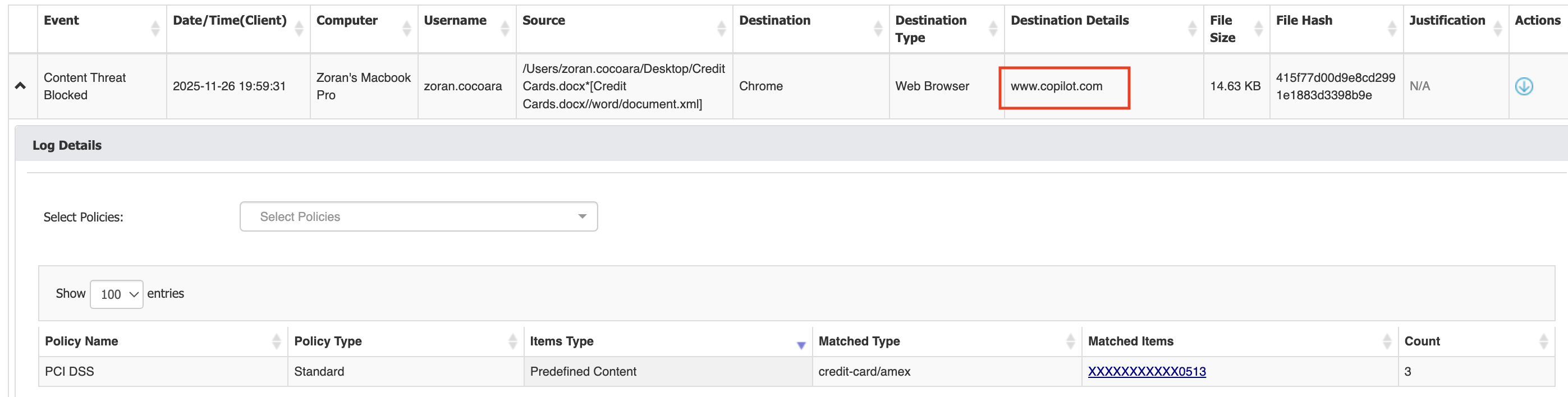
Support for AI applications has been added a while ago. The Endpoint Protector client can monitor interactions with ChatGPT, Gemini, Claude, Copilot, DeepSeek, Perplexity.ai and Meta.ai. This means that file uploads and prompts over the web browser are scanned for sensitive content and can be reported or blocked in case of policy violations. The details include Username, Computer Name, Application, URL, Date and Time, Policy Name etc.
This is how the reports look like when users attempt to upload sensitive data to Copilot:
Endpoint Protector isn’t designed to monitor all AI prompts. It’s designed to flag only the sensitive data within prompts or files uploaded to AI tools. So this isn’t something we can change on a Zoom call, it’s a product design decision.
I do see the value in having visibility into all prompts, not just the ones with sensitive data, though that could raise privacy concerns for some customers. The decision on whether to add it to the roadmap sits with our Product Management team, which I’m not part of, but I’m also curious to hear their feedback once they review the request.
Thank you for sharing the information and the image regarding AI tool monitoring in the Endpoint Protector Community Portal.
I have attached the screenshot that you shared. Based on this screenshot, could you please provide the step-by-step configuration process in the Endpoint Protector console to achieve the same setup.
Specifically, we would like to understand how to configure Endpoint Protector to monitor AI tools such as ChatGPT, Microsoft Copilot, Claude AI, Gemini, and Perplexity, and how to capture the destination details (e.g., AI website), source file, policy triggered, and other relevant information as shown in the screenshot.
A detailed configuration guide or screenshots of the Endpoint Protector console would be greatly appreciated.
Thank you for your support. We look forward to your response.
For Endpoint Protector to inspect AI file uploads and prompts, you need a couple of things in place:
A Content Aware Protection policy applied to all Web Browsers and the ChatGPT, Claude, and Microsoft Copilot desktop apps, listed under Cloud Services / File Sharing.
Deep Packet Inspection enabled. This can be done under Device Control → Global Settings → DPI Configuration. If you’re on a Mac, please follow the steps outlined here first. Enabling DPI on Macs without deploying the certificate in the keychain can cause serious connectivity problems.
Enabling Deep Packet Inspection and Intercepting VPN Traffic on macOS Clients | Netwrix Product Documentation Enabling Deep Packet Inspection and Intercepting VPN Traffic on macOS Clients | Netwrix Product Documentation
Go to Content Aware Protection → Deep Packet Inspection and make sure DPI is enabled for ChatGPT, Claude, Microsoft Copilot, and all the browsers you’re monitoring with the Content Aware Protection policy.
With these settings in place, the Endpoint Protector client will monitor both file uploads and prompts to AI services.
With the above configuration all AI prompts will be scanned for sensitive content, but only the ones that actually contain sensitive content will be blocked or reported. Also, the reports will display only the flagged keyword/PII, not the entire prompt.
Based on the thread it seems like you would like to see all prompts, regardless of content, and that’s not something the product does.
Maybe @MihaiRosca from our Product Management team can chime in and let us know if this is something that we can consider for the future.