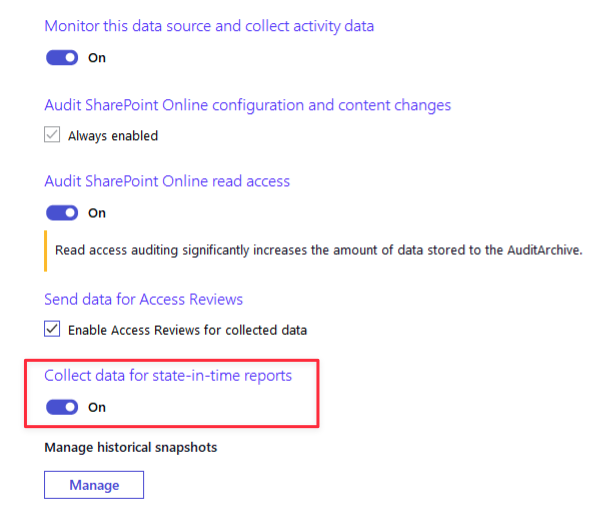
I have this Sharepoint Online Mon. Plan (SharePoint_Online_New) enabled “state-in-time report”. I am using modern authentication with all required permission. However, the Issue Is, while running the “SharePoint Online - State-in-Time” Report , I am getting an error & even I don’t see monitoring plan being selected while running the report. Please note that, normal report Is able to fetch the activities.
I have affiliated all relevant screenshots for your perusal. kindly help me to troubleshoot this.
This is most likely an issue with a setting inside of your SharePoint Online Monitoring Plan. If you open your Monitoring Plan, select “Edit Data Source”, you need to enable the option “Collect data for state-in-time reports”. Once you do that, if you wait overnight, it will run and then you should be able to run those reports.
Thank you for sparing your valuable time for the reply. Please note that, “Collect data for state-in-time” report option is already been selected since I created the Mon. Plan. still, no luck…
Apologies for missing that in the original description! A couple of quick questions to help narrow this down:
When did you create the plan? The State-in-Time typically generates overnight, so if it was created the same day or late the previous day, it may not have had enough time to complete.
In the meantime, could you open the plan, select Edit Data Source, and click Manage under the State-in-Time option? Let me know whether you see anything listed in the left or right columns on that screen.
If something is listed there but the reports still aren’t working, it’s possible the State-in-Time ran into an issue uploading to the database. Do you know which edition of SQL you’re running? Standard and Enterprise editions should be fine, but if you’re on Express, the SharePoint State-in-Time file may be pushing the database size over the Express size limit.
Let me know what you find, and if we can’t get it sorted out from here, I’m happy to open a support ticket so one of our engineers can reach out directly.
Michael Purdin
Manager, Technical Support Engineering
Thank you for the response. I have checked the above options, However, under Edit Data Source, > Manage > Nothing showing here. It’s empty. kindly assist further now. With Thanks!
We might be at the point where I’ll need to open a support ticket for you. However, before that, can you confirm if you are version 10.8 yet? With the Office 365 collectors, there are many times that Microsoft makes changes and those changes are in the latest version of Auditor. I believe from another post, I saw that you may be on 10.7. Can you upgrade to 10.8 and see if that helps gets the State-in-Time working and then let me know if that does not help and I can open a support ticket for you. I can include what we’ve done here in the Community so that they don’t check things that we’ve already checked.
Michael Purdin
Manager, Technical Support Engineering
I am already on 10.8. Further, I have raised a support ticket [00476574] & support Eng. did all the possible troubleshooting but still we are having same Issue. so, lastly, we thought to grant “Cloud Administratation” role to the app ID. Many thanks for everything. Appreciate it.
I’m seeing exactly the same anomaly: no snapshot generated at all, and I’m unable to generate reports.
The scheduled monitor is still collecting logs properly.
I thought it might be a Netwrix version issue, but even after upgrading to 10.9, the problem persists.
If Support managed to find a solution, I’d be interested to know what it was. (I haven’t opened a case yet.)
PS: Same thing for 1secure and other customers too—no issues with collection, and the methodology is practically identical. (app 365 / API / permissions via an admin account, etc. / client secret, etc.)
Thanks in advance for your feedback, and have a great weekend.
Welcome to the Netwrix Community! I’m sorry that you are having issues with the State-in-Time for a Monitoring Plan/Data Source.
This is an issue that we see from time and time and we usuaully get to the bottom of what’s going on and can fix it. It can be a number of different reasons.
If you wanted to open a support ticket, we will be able to assist you. If you wish to stay here on the Community, if you would post the exact error you are getting (if you are getting one) and for which data source(s) you are getting the error in, I can try to point you in the right directlon.
Michael Purdin
Manager, Technical Support Engineering
The snapshots work during the 3:00 a.m. collection, but the next day the next snapshot overwrites it. Because of this, I don’t have any history of the stat-in-time snapshots
My customer uses SQL Express, but since no error was reported, I don’t know whether the snapshot exceeds the SQL Express quota or not.
To get back to the original ticket, what was the resolution? And historically, what were the resolutions for similar issues?
Can you help clarify what the issue is for me? You are saying that the snapshot work at 3AM and then the next day, the next days snapshot overwrites it. That is by design and that is how every State-in-Time snapshot works.
One thing I will mention is that for Exchange Online, we do not keep the history like we do for File Server, Windows Server, Active Directory, etc. As you can see in my snapshot, I only have today’s that I can use.