I upgraded to PPE Vers. 11 where the HIBP Update tool for the compromised password option is in place.
Is there a way to create an additional own list or database for compromised password? Version 9 of PPE supported a list of Hashes?
I upgraded to PPE Vers. 11 where the HIBP Update tool for the compromised password option is in place.
Is there a way to create an additional own list or database for compromised password? Version 9 of PPE supported a list of Hashes?
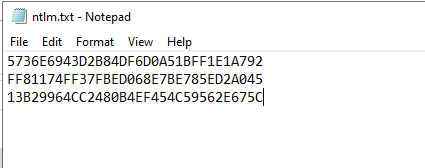
You can make your own database by creating a .txt file named ‘ntlm.txt (it is important for the .txt to be named this as the tool to create the database folder will be looking for a .txt file named ntlm.txt) with each password on its own separate line, these passwords need to be in NTLM hash format. For example:
The password entry ‘P@ssword’ needs to be in a NTLM hash: 13B29964CC2480B4EF454C59562E675C
Once you have every password entry in NTLM hash format and each one on a sperate line of the .txt file:
Compress the .txt in a .zip folder, then you can set this in HIBP Updater using Full Download, File and designating the custom .ZIP folder:
Once you have set those and the location you want to create the Database Folder in (Passwords Hash Database Folder field), click apply > Yes to the prompt and let it process. Once it processes, you should have a database folder:
Then apply it to a policy and test it for validation:
Hi, i tried your solution.
created an ntlm.txt with one ntml hash per line
compress as ntlm.zip
The Update errors with “Can’t create store from the file

Worked in previous versions of HIBP, probably a bug. Make a ticket so it can be addressed by R&D.
Update to this:
When the custom .TXT has been created, it is required to use 7ZIP File Manager > right click on the .TXT > 7Zip > Add to “ntlm.7z”. Rename the file “ntlm.7z” to “ntlm.zip” and use with HIBP Updater in place of the normal process of zipping the file as zipping using 7Zip is now required as it was not in previous versions.