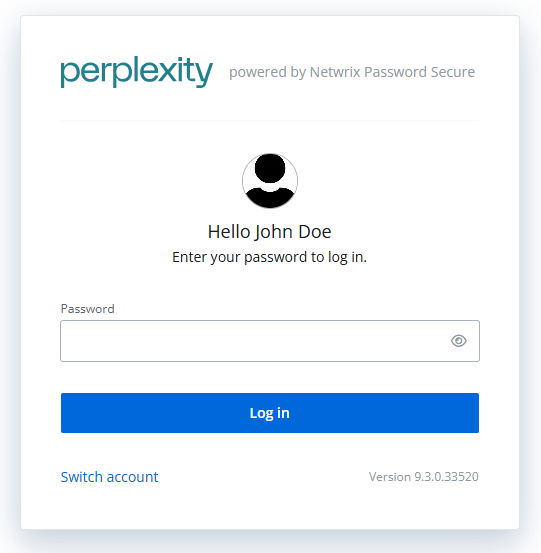
Logging in just got simpler! Users can now sign in with only the first part of their email address — no need to type the full thing every time. It’s faster, more natural, and exactly how most people are used to signing in.
Make It Yours: Customer Branding for Web App
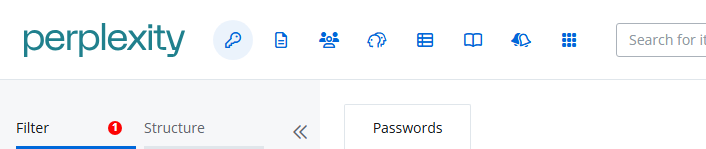
Give your web app a personal touch! You can now add your company’s logo and name to the interface — helping your users feel right at home in a familiar, branded environment. A simple way to boost trust and user adoption.
Thanks for the infos. A hint for the “Support”-NOTE: From the “official” releases (that I know), next release running out of support maybe is version “9.0.3”, right? Because “9.0.0” already went out in August 2025. It`s a little bit “corked” this month with “9.3.0” und “9.0.3”
After installing 9.3.0, my Server Manager shows a database error (“Problem with database detected”) – in the log “Repaired Items of Container: Unknown Container.”
Hey Markus - welcome to the community, and thanks for your question
Yes, you can do it in just one step. Please note, however, that starting with version 9.2.3, there are some breaking changes related to SQL Server… as stated in our minimum system requirements, SQL Server 2019 is now the minimum supported version.
For other changes, please review the release notes
Hello @Sascha Good day,
Kindly, please do we have a documentation could help me to integrate my Password Secure with Entra for integration or SSO.
I need to made all users has the ability to login with the Active directory users and Emails in same time.
like they have defrent Idenity
Hey we’re currently working on a bigger update of our documentation. As of now, we’ll try to provide the minimum to ensure information is available… We’ll come up with a better solution as fast as we can!!
For the customized branding, we added a short paragraph here
If you have any additional questions, please feel free to ping me directly.
Hey Ramy Welcome to our community and thanks for your question
Overall, documentation is available here - some information about the technical implementation is available here
Specifically, a setup with provisioning and authentication with MS Entra ID has a lot of different configuration options… if you have specific questions, please feel free to ping me directly or/and to ask our customer support for help.
I would like to provide feedback on the current administration documentation and offer some suggestions for improvement.
It would be extremely helpful to have explicit administration documentation that addresses technical details. The current documentation is more like a user manual and doesn’t adequately answer technical questions, such as:
What are the consequences of certain settings?
What dependencies exist between different configuration options?
Furthermore, I find the lack of clear and comprehensive instructions for administration via the web client, compared to the full client, concerning. Some important functions in the web client appear to be insufficiently documented, such as:
Editing system tasks for synchronization.
Changing existing password forms.
Detailed and technically sound documentation would not only simplify the work of administrators but also help prevent errors and increase efficiency.
Thank you in advance for your support and for considering these suggestions.
Since updating to 9.2.6.33415, we have been experiencing extreme performance issues. The entire client freezes completely, which was not the case before.
We hadn’t updated for about a year, and the entire solution was running very smoothly and efficiently. Since the update, we have been experiencing massive disruptions.
Support referred us to the web version, but for our administrators, this means a complete changeover, as the web version does not have the same clear layout, for example. ZScaler was also mentioned as the reason, but we have been using it for the last 3 years without any problems. I hope for a quick fix. We haven’t updated to the latest version yet, but we’ll have to do that in the next few days. It always takes a bit of effort to roll out the client.
Hope there will be a solution for this “freezing client”
I’m really sorry to hear that your recent update caused this issue on your side. While a few customers have reported similar behavior, it isn’t something specific to a single version.
The good news: we’ve addressed several client freezing and general performance issues in version 9.3.0, so we highly recommend updating to this release.
If you continue to experience any problems after the update, please don’t hesitate to open a ticket with our customer support team… they’ll be happy to assist
We have now upgraded our Mateso environment to the latest version. I opened several tabs and worked for about 1–2 hours. Unfortunately, the application continues to crash or freeze. Although performance has improved, the client still freezes at least once or twice when actively working.
However, we have noticed the following: If offline synchronisation is running and the client freezes, it is possible to close the application by right-clicking on the taskbar. A dialogue box then appears asking if you want to cancel offline synchronisation, after which the client continues to run as usual. We have now tested this intentionally 4–5 times and can make the client freeze by opening multiple tabs. If offline synchronisation is not running, unfortunately it is not possible to rescue the client and it must be closed completely.
Honestly, this looks like a backend problem to us. We never experienced these issues in the last two years (before the update) and have encountered them since the new version was introduced.
I am currently planning the update of the server service/web service and client from version 9.2.1.32530 to the latest version.
Now the question is whether a new build is planned to be released in the next few weeks, which I could wait for, so as not to immediately fall behind again with version 9.3.0.33526.


 support for Version 9.0.3.30606 (and older) has stopped. We will also adjust the website.

 we’re currently working on a bigger update of our documentation. As of now, we’ll try to provide the minimum to ensure information is available… We’ll come up with a better solution as fast as we can!!
