What is a one sentence summary of your feature request?
When we pull lockout reports It would be nice to get Workstation Details in the “User Account Locks and Unlock” report
Please describe your idea in detail. What is your problem, why do you feel this idea is the best solution, etc.
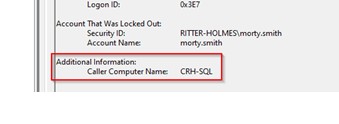
Netwrix generates reports based on event logs—for example, event IDs 4740 and 4767 are included. However, the “Caller Computer Name” field is not captured in the report, even though it’s available in the original event log.
How do you currently solve the challenges you have by not having this feature?
I logged into one of the Domain Controllers and filtered for event IDs 4740 and 4767, which provided the information I needed. However, it would be much more efficient to retrieve this data from a centralized source rather than having to log into the DC server each time.
Netwrix is intended to reduce the need for direct access to servers, and ideally, we should be able to pull this information directly from it. While Netwrix offers extensive functionality, it still has some limitations—especially when it comes to retrieving the same event data that’s readily available in Event Viewer. This is an area where we should expect more streamlined access.