What is a one sentence summary of your feature request?
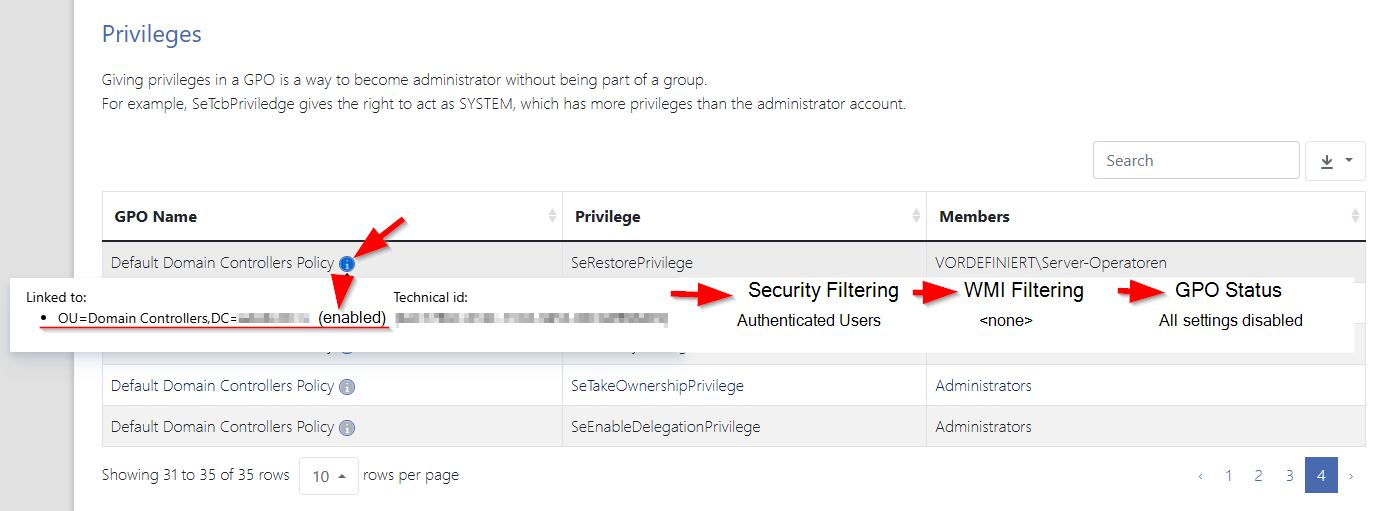
Add GPO details like “Security Filtering” and “WMI Filtering” in reports
Please describe your idea in detail. What is your problem, why do you feel this idea is the best solution, etc.
When validating configurations reported in certain areas like “GPO” → “Login” or “Password Policies” → “Password policies” the tables show the name of a GPO and in the tooltip of the (i)-symbol there are the “Linkted to” (aka “Links”) and “Technical id” (aka “Unique ID”) details. I would like to see “Security Filtering” and “WMI Filtering” as well. Possibly a note for enabled/disabled Links and Disabled DPO Status (All/Computer/User configuration settings disabled) would be great.
In some cases the “delegation” → “Advanced” ->“Apply group policy” → “deny” setting for certain “groups or user names” would be great to know as well
You can only say for sure whether it might be a relevant configuration if you have all these information.
Of course, the GPO order, inheritance and enforcement can also change if it is relevant. For my initial validations, this information would not be necessary.
The GPO details tooltip is used in “GPO”, “Password Policies”, “Advanced”,…
The GPO details tooltip is not used in “PKI” → “Certificates” → “Trusted Certificates” and not in Risks like “A-MD2RootCert” (wich links to “Certificates”), “A-MembershipEveryone”, … Maybe these could be extended as well some time
How do you currently solve the challenges you have by not having this feature?
Currently, I need to be in the environment with “Group Policy Management” open to evaluate whether the settings are an issue.