What is a one sentence summary of your feature request?
A PowerShell-based tool to audit Active Directory computer accounts
Please describe your idea in detail. What is your problem, why do you feel this idea is the best solution, etc.
A PowerShell-based tool to audit Active Directory computer accounts, with a focus on identifying inactive and active Windows devices based on LastLogonDate.
The tool can be found here:
I wrote the tool while trying to solve a PingCastle finding “Obsolete OS (Windows 10 or Windows 11)”.
PingCastle can output all the computers via its own menu option.
“PingCastle will produce a list of all your computers with the OS version in a csv file”
While this works well, I found the information overhead a tad too much. In addition to that, I have multiple clients I take care of. I do this via RDP, and most of the time copying files out of the machine I am currently on is disabled - which prolongs the analysis. Hence, this small tool, based on the PowerShell command present in the solution.
With the tool, the user can:
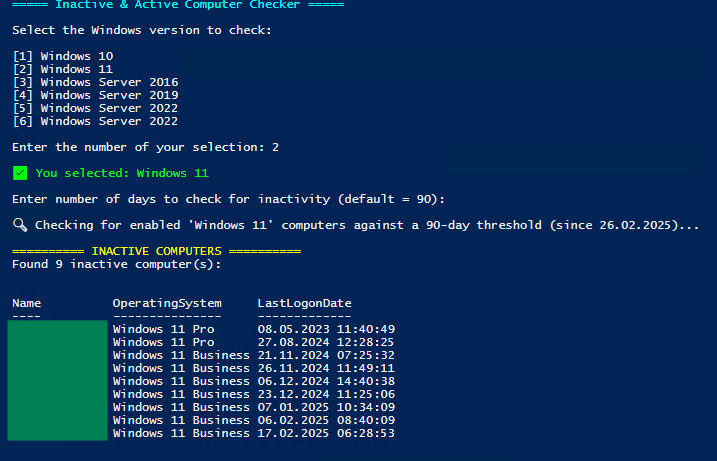
- decide which windows version he wants to audit,
- choose a custom time window for the LastLogonDate (default is 90 days)
- see instantly which computers are inactive and active
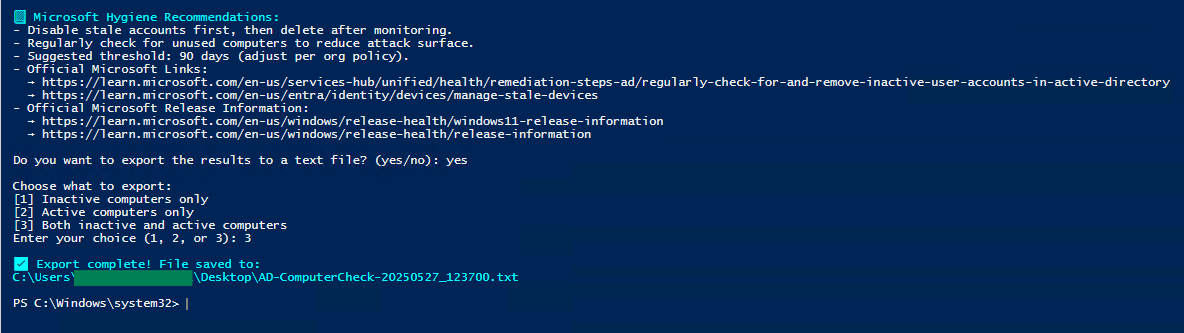
- get some hygiene recommendations on how to handle the computers
- choose to write inactive, active or all computers to a text file
License: MIT
(As of writing this, I noticed, I missed out on adding the Version of the Windows OS - this will be added soon)
How do you currently solve the challenges you have by not having this feature?
The PowerShell command present in the solution.
Get-ADComputer -Filter * -Property * | Format-Table Name,OperatingSystem,OperatingSystemServicePack,OperatingSystemVersion -Wrap -Auto You can replace [-Filter ] by [-Filter {OperatingSystem -Like "Windows 1"}

 )
)